Plans and things to do
An event sets aside time. A task is something to do.
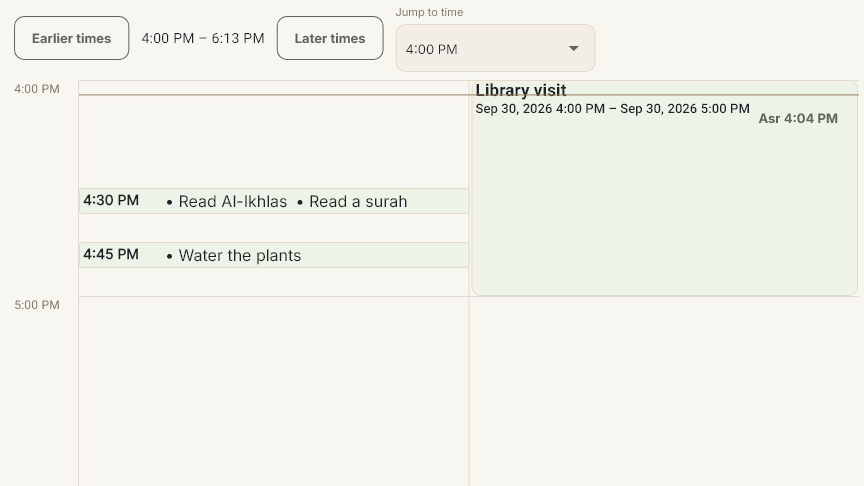
Check the displayed date, view and family filter before reading an entry. Day shows one day, Week shows the surrounding days, and Month gives a broader view. Today returns to the current day.
Family and source filters change what you see, not your permissions. Opening an entry or locating its task card does not complete the task.
Read any coverage message. An incomplete list does not prove that nothing else is planned.
Return to an unfinished event
Closing an editor can keep your unfinished draft.
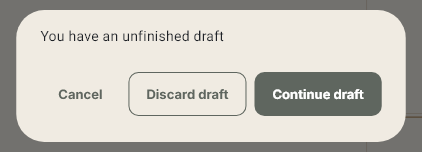
1. Close the event editor without saving. In this example, Return library books remains an unfinished draft; no event has been added.
2. Choose + Add, then Event, to reach the unfinished-draft prompt.
3. Choose Continue draft to return to the unfinished event. Choose Cancel to leave the prompt and keep the draft.
If a task editor offers Cancel, do not assume that closing it discards its unfinished draft. Check the draft options before starting again.
Discard a draft or check a save
Use Discard draft only when you want to remove unfinished changes.
From + Add → Event, choose Discard draft when that option is offered. In this example, the unfinished event is removed and no event is created.
Cancel and Discard draft are different: Cancel leaves this prompt and keeps the draft; Discard draft removes it.
If the app offers Check save, the save has not yet been confirmed. Use that option to resolve the result before treating the changes as saved or discarded.
Closing an editor after a save has started does not establish that the save was cancelled. Follow the message shown and check the saved entry.
Shared tasks and other contexts
A shared household task has one shared result. Tasks assigned to individual people keep separate results. Check the task, date and assignment before reporting.
Done means completion was recorded. For a task requiring parent confirmation, Waiting for parent means the submission still needs confirmation. Changing the family filter does not provide parent authority.
Undo submission withdraws a submitted report. Undo completion reverses a recorded completion. Use only the action offered for the correct task and person, then check the result.
Tasks supplied by an app can have their own completion flow. Opening a Quran task is not automatically a reading report; see the Quran reporting lesson.
Further topics
Detailed walkthroughs for the following topics are not included in this guide.
Repeating and all-day plans: Repeating-event edit scope and all-day dates.
Time zones and coverage: Source time zones, displayed times and incomplete views.
Reminders, schedules and changes: Flexible weekly/monthly tasks, reminders, edits, pause/resume, deletion and undo.
Search and app activities: Finding entries, source filters and supported app activities.